Serverpod · Flutter · Dart · BLoC · Clean architecture
Build a full-stack Dart app with Serverpod, Flutter, BLoC and clean architecture
A step-by-step Serverpod 4 tutorial: a Dart backend on PostgreSQL and a Flutter app built with BLoC and clean architecture, tested on both sides.
Serverpod lets you write your backend in Dart, the same language as your Flutter app. The server and the app share the same model classes, and the code that moves data between them is generated for you. In this tutorial you'll build a small task app end to end: a Serverpod server that stores tasks in PostgreSQL, and a Flutter app organised with clean architecture and BLoC.
It's written for students and developers who know basic Flutter (widgets, async and await) and want to see how a real project is laid out: where each file goes, why it goes there, and how to test it.
What you'll build
The app is called Taskly. You can add a task, tick it off and delete it. Tasks are saved in PostgreSQL, so they survive an app restart. It's small on purpose: the goal is to see every layer clearly, not to build lots of features.
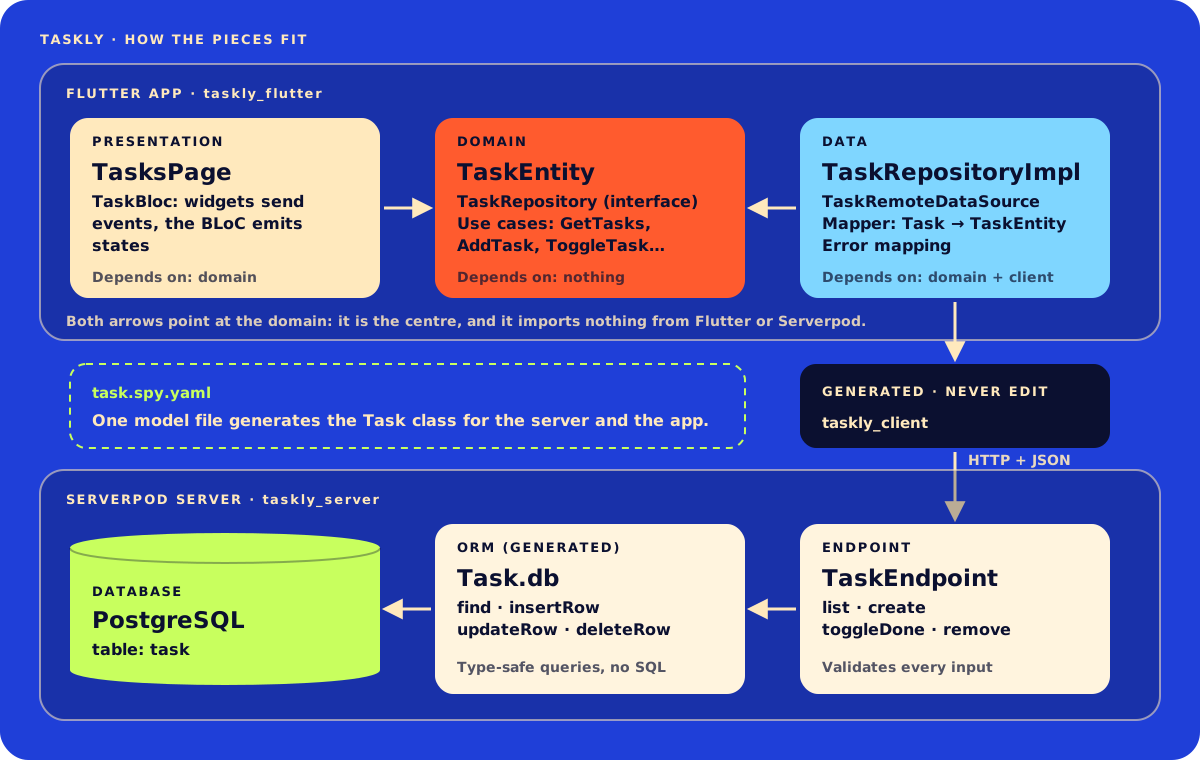
Here's the diagram in words:
- Serverpod server: a
Taskmodel mapped to a database table, and aTaskEndpointwith four methods:list,create,toggleDoneandremove. - Generated client: Serverpod turns the endpoint into typed Dart methods, so the app calls
client.task.create('Buy milk')instead of building HTTP requests and parsing JSON. - Flutter app: three layers. The presentation layer (widgets and the BLoC) and the data layer (which talks to the client) both depend on the domain layer, which is plain Dart.
Why Serverpod for a Flutter app?
You can pair Flutter with any backend; I also build them with Laravel, FastAPI and Node.js (see backend development). Serverpod is worth a look when the team is Flutter-first:
- One language. Dart on the phone and on the server, so models and validation rules can be shared.
- No API glue code. You write a method on the server and Serverpod generates the matching client method. Rename a field and the app fails to compile, instead of failing in front of a user.
- A database built in. Models with a
tablekey get type-safe queries (Task.db.find(...)) and migrations. - A fast dev loop. One command runs the server, the database and the app, and hot reloads both sides when you save.
It's a weaker fit when most of your API's users aren't Dart apps, or when your team already runs a mature backend in another language. Then the generated client, Serverpod's biggest advantage, matters less.
Step 1: Create the Serverpod project
Install the Serverpod command-line tool and check that it works. If you installed an older version with dart pub global activate, run dart pub global deactivate serverpod_cli first.
dart install serverpod_cli
serverpod version
Create the project:
serverpod create tasklyThe setup screen asks a few questions. Keep the database; you can leave authentication, Redis and the web server off for this tutorial. You get one workspace with three packages:
taskly/
├── taskly_server/    # endpoints, models, config and migrations
├── taskly_client/    # generated code the app uses to call the server
└── taskly_flutter/   # the Flutter app
You write code in taskly_server and taskly_flutter. Serverpod writes taskly_client for you, so never edit it by hand: it's overwritten every time code is generated.
Start everything from the project root, and leave it running for the rest of the tutorial:
cd taskly
serverpod start
serverpod start runs the server, an embedded PostgreSQL database and the Flutter app (in your browser by default) in one terminal. When you save a file, it regenerates code and hot reloads. Three keys matter here: M creates and applies a database migration, R restarts, and Q quits.
Step 2: Define the Task model
Serverpod models are YAML files ending in .spy.yaml, placed anywhere under the server's lib folder. I keep each feature's files together. Create the task model:
### A single to-do item.
class: Task
table: task
fields:
  ### What needs doing.
  title: String
  ### Whether the task is finished.
  isDone: bool, default=false
  ### When the task was created.
  createdAt: DateTime, default=now
class: Taskgenerates aTaskDart class for both the server and the app.table: taskalso stores it in a database table. Serverpod adds anidfield (an auto-incrementingint) for you.default=falseanddefault=nowmean you can create a task with only a title. Lines starting with###become doc comments in the generated code.
Next, a model for errors. Serverpod can send your own exception types to the app, where you catch them by type like any Dart exception:
### Thrown when a request about tasks can't be completed.
exception: TaskException
fields:
  message: String
Save both files and serverpod start regenerates the code. The database doesn't change on its own, though: press M in the terminal to create a migration and apply it. That creates the task table.
Step 3: Write the endpoint
An endpoint is a class that extends Endpoint. Each public method takes a Session first, returns a Future, and becomes a method on the generated client:
import 'package:serverpod/serverpod.dart';

import '../generated/protocol.dart';

/// Called from the app as `client.task`.
class TaskEndpoint extends Endpoint {
  /// All tasks, newest first.
  Future<List<Task>> list(Session session) async {
    return Task.db.find(session, orderBy: (t) => t.createdAt.desc());
  }

  /// Saves a new task and returns it with its database id.
  Future<Task> create(Session session, String title) async {
    final trimmed = title.trim();
    if (trimmed.isEmpty) {
      throw TaskException(message: 'Write something first.');
    }
    if (trimmed.length > 200) {
      throw TaskException(message: 'Keep tasks under 200 characters.');
    }
    return Task.db.insertRow(session, Task(title: trimmed));
  }

  /// Flips a task between done and not done.
  Future<Task> toggleDone(Session session, int id) async {
    final task = await _find(session, id);
    return Task.db.updateRow(session, task.copyWith(isDone: !task.isDone));
  }

  /// Deletes a task.
  Future<void> remove(Session session, int id) async {
    final task = await _find(session, id);
    await Task.db.deleteRow(session, task);
  }

  Future<Task> _find(Session session, int id) async {
    final task = await Task.db.findById(session, id);
    if (task == null) {
      throw TaskException(message: 'That task no longer exists.');
    }
    return task;
  }
}
A few things to notice:
- The class is called
TaskEndpoint, so the app calls it asclient.task. Serverpod drops theEndpointsuffix. - Validate on the server. The app will check for empty titles too, but a server must never trust its clients: anyone can call your API.
findByIdreturnsnullwhen there's no such row, so_findturns that into aTaskExceptionthe app understands. Methods starting with_are private and aren't exposed to the app.copyWithcomes from the generatedTaskclass.
What about other errors? An exception you don't catch reaches the app as a generic error with status 500 and no details, so internal messages never leak to users. Only exceptions you define in .spy.yaml files, like TaskException, arrive with their fields.
The generated client changed, so press R in the serverpod start terminal to restart.
Step 4: Test the endpoint
New Serverpod projects come with generated test tools. They call your endpoints like plain Dart functions, against a real test database that's rolled back after every test:
import 'package:taskly_server/src/generated/protocol.dart';
import 'package:test/test.dart';

import 'test_tools/serverpod_test_tools.dart';

void main() {
  withServerpod('Given the task endpoint', (sessionBuilder, endpoints) {
    test('when a task is created then it is listed', () async {
      await endpoints.task.create(sessionBuilder, 'Write the blog post');

      final tasks = await endpoints.task.list(sessionBuilder);

      expect(tasks.single.title, 'Write the blog post');
      expect(tasks.single.isDone, isFalse);
    });

    test('when the title is blank then it throws TaskException', () async {
      await expectLater(
        endpoints.task.create(sessionBuilder, '   '),
        throwsA(isA<TaskException>()),
      );
    });
  });
}
Run the tests from the server package:
cd taskly_server
dart test
You don't need to start a database first. In new projects the test server manages its own PostgreSQL (that's the dataPath setting in config/test.yaml).
Step 5: Plan the Flutter app with clean architecture
Now the app. Clean architecture splits a feature into three layers, with one rule: dependencies point inwards, towards the domain.
| Layer | What it holds | What it may import |
|---|---|---|
| Presentation | Widgets, the BLoC, its events and states | Domain |
| Domain | Entities, repository interfaces, use cases | Nothing (plain Dart) |
| Data | Repository implementations, data sources, mappers | Domain and taskly_client |
Why bother? The domain layer describes what the app does without saying how. The BLoC asks a use case to "add a task" and doesn't know whether that means Serverpod, Firebase or a local database. So you can test the BLoC with a fake repository, and if the backend changes, only the data layer changes.
Add the packages from inside taskly_flutter:
cd taskly_flutter
flutter pub add flutter_bloc equatable
flutter pub add dev:bloc_test dev:mocktail
Then create this structure. main.dart and client.dart already exist, and the scaffolded screens folder can stay or go:
taskly_flutter/lib/
├── main.dart                     # composition root: creates and connects objects
├── client.dart                   # created by serverpod create
└── features/tasks/
    ├── domain/
    │   ├── task_entity.dart
    │   ├── task_failure.dart
    │   ├── task_repository.dart
    │   └── task_use_cases.dart
    ├── data/
    │   ├── task_remote_data_source.dart
    │   ├── task_mapper.dart
    │   └── task_repository_impl.dart
    └── presentation/
        ├── bloc/
        │   ├── task_bloc.dart
        │   ├── task_event.dart
        │   └── task_state.dart
        └── tasks_page.dart
Step 6: The domain layer
Start in the middle, with plain Dart. First the entity, which is the app's own idea of a task:
import 'package:equatable/equatable.dart';
class TaskEntity extends Equatable {
const TaskEntity({
required this.id,
required this.title,
required this.isDone,
required this.createdAt,
});
final int id;
final String title;
final bool isDone;
final DateTime createdAt;
List<Object> get props => [id, title, isDone, createdAt];
}Why not use the generated Task class everywhere? You could, but then every widget and the BLoC would depend on the server's model. TaskEntity has exactly the fields the app needs, an id that's never null, and value equality from Equatable. BLoC uses that equality to decide whether a new state is really different.
Next, one error type for the whole feature, so the presentation layer never deals with Serverpod's exceptions:
/// Something went wrong, with a message that's safe to show the user.
class TaskFailure implements Exception {
const TaskFailure(this.message);
final String message;
String toString() => message;
}The repository interface says what the feature needs, not how it's done:
import 'task_entity.dart';

/// Stores tasks somewhere. Every method throws TaskFailure on errors.
abstract interface class TaskRepository {
  Future<List<TaskEntity>> getTasks();
  Future<TaskEntity> addTask(String title);
  Future<TaskEntity> toggleTask(int id);
  Future<void> deleteTask(int id);
}
Finally the use cases, one class per action. Most of them pass the call straight through. AddTask also holds a business rule, which is exactly the kind of logic use cases are for:
import 'task_entity.dart';
import 'task_failure.dart';
import 'task_repository.dart';

class GetTasks {
  const GetTasks(this._repository);
  final TaskRepository _repository;

  Future<List<TaskEntity>> call() => _repository.getTasks();
}

class AddTask {
  const AddTask(this._repository);
  final TaskRepository _repository;

  Future<TaskEntity> call(String title) async {
    final trimmed = title.trim();
    // Same rule as the server, checked here to save a round trip.
    if (trimmed.isEmpty) throw const TaskFailure('Write something first.');
    return _repository.addTask(trimmed);
  }
}

class ToggleTask {
  const ToggleTask(this._repository);
  final TaskRepository _repository;

  Future<TaskEntity> call(int id) => _repository.toggleTask(id);
}

class DeleteTask {
  const DeleteTask(this._repository);
  final TaskRepository _repository;

  Future<void> call(int id) => _repository.deleteTask(id);
}
A class with a call method can be used like a function, so the BLoC can write await addTask('Buy milk').
Step 7: The data layer
This is the only layer that imports taskly_client. Start with a thin data source around the generated endpoint:
import 'package:taskly_client/taskly_client.dart';

/// The one class that calls the Serverpod task endpoint.
class TaskRemoteDataSource {
  const TaskRemoteDataSource(this._client);
  final Client _client;

  Future<List<Task>> fetchAll() => _client.task.list();
  Future<Task> create(String title) => _client.task.create(title);
  Future<Task> toggleDone(int id) => _client.task.toggleDone(id);
  Future<void> remove(int id) => _client.task.remove(id);
}
With a REST backend, this is where you'd build URLs and parse JSON. Serverpod's generated client already does that, so the class stays small. It's still worth having: you can test the repository with a fake data source, and it's the natural place to add a local cache later.
The mapper turns the generated Task into a TaskEntity:
import 'package:taskly_client/taskly_client.dart';

import '../domain/task_entity.dart';

extension TaskMapper on Task {
  TaskEntity toEntity() => TaskEntity(
    id: id!, // Rows read from the database always have an id.
    title: title,
    isDone: isDone,
    createdAt: createdAt.toLocal(), // Serverpod sends DateTime as UTC.
  );
}
The repository implementation ties them together and turns Serverpod's errors into TaskFailure:
import 'package:taskly_client/taskly_client.dart';
import '../domain/task_entity.dart';
import '../domain/task_failure.dart';
import '../domain/task_repository.dart';
import 'task_mapper.dart';
import 'task_remote_data_source.dart';
class TaskRepositoryImpl implements TaskRepository {
const TaskRepositoryImpl(this._remote);
final TaskRemoteDataSource _remote;
Future<List<TaskEntity>> getTasks() => _guard(() async {
final tasks = await _remote.fetchAll();
return tasks.map((task) => task.toEntity()).toList();
});
Future<TaskEntity> addTask(String title) =>
_guard(() async => (await _remote.create(title)).toEntity());
Future<TaskEntity> toggleTask(int id) =>
_guard(() async => (await _remote.toggleDone(id)).toEntity());
Future<void> deleteTask(int id) => _guard(() => _remote.remove(id));
/// Runs [call] and turns every Serverpod error into a [TaskFailure].
Future<T> _guard<T>(Future<T> Function() call) async {
try {
return await call();
} on TaskException catch (e) {
// Our own exception from the server: the message is written for users.
throw TaskFailure(e.message);
} on ServerpodClientNetworkException {
throw const TaskFailure('Cannot reach the server. Check your connection.');
} on ServerpodClientException {
throw const TaskFailure('Something went wrong. Please try again.');
}
}
}The order of the on clauses matters: the most specific error comes first. ServerpodClientNetworkException means the app couldn't reach the server at all (offline, wrong URL, timeout). ServerpodClientException catches the rest, including the generic 500 error.
Step 8: The presentation layer with BLoC
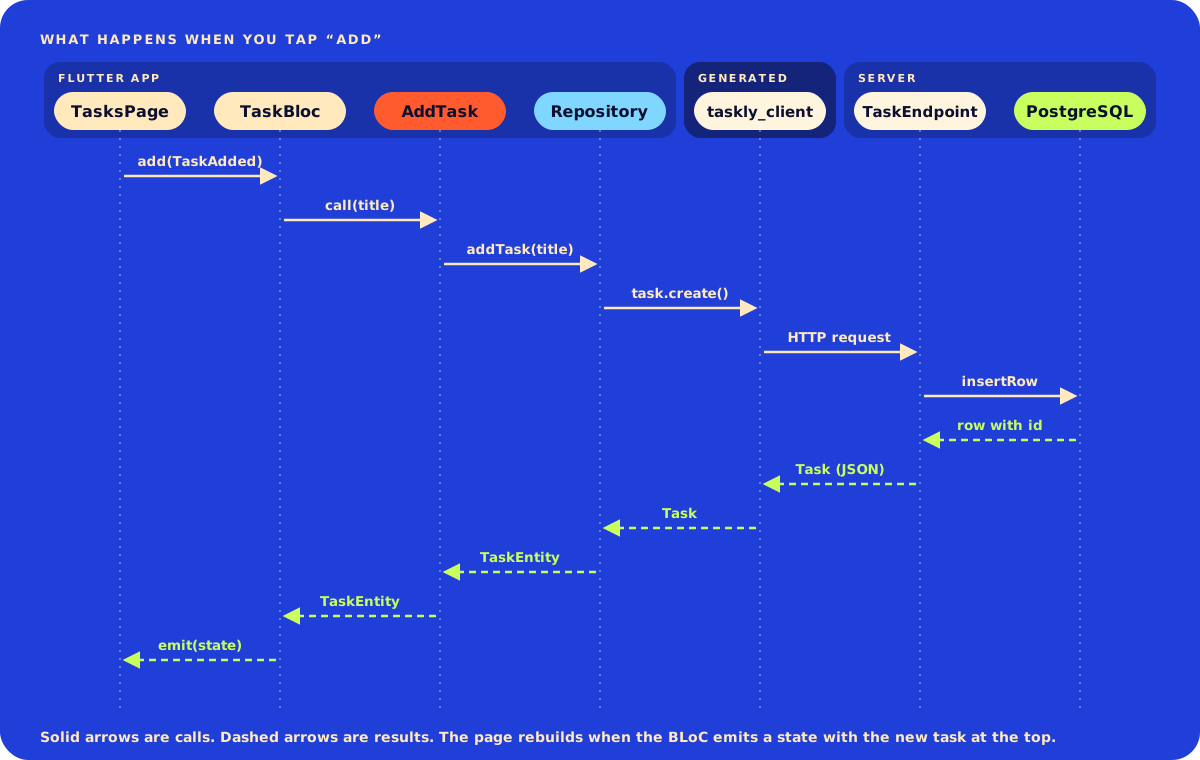
A BLoC receives events (things that happened, usually user actions) and emits states (what the screen should show). Widgets never call the repository: they add events and rebuild from states.
The events come first, one class per user action. sealed tells the compiler this is the complete list:
part of 'task_bloc.dart';

sealed class TaskEvent {
  const TaskEvent();
}

/// The screen opened, or the user wants to try again.
final class TasksRequested extends TaskEvent {
  const TasksRequested();
}

final class TaskAdded extends TaskEvent {
  const TaskAdded(this.title);
  final String title;
}

final class TaskToggled extends TaskEvent {
  const TaskToggled(this.id);
  final int id;
}

final class TaskDeleted extends TaskEvent {
  const TaskDeleted(this.id);
  final int id;
}
For the state I use one class with a status field, rather than a separate class for loading, loaded and error. A list screen should keep showing its tasks while it saves, or after an error, and a single class with copyWith makes that easy:
part of 'task_bloc.dart';
enum TaskStatus { initial, loading, success, failure }
final class TaskState extends Equatable {
const TaskState({
this.status = TaskStatus.initial,
this.tasks = const [],
this.errorMessage,
});
final TaskStatus status;
final List<TaskEntity> tasks;
final String? errorMessage;
TaskState copyWith({
TaskStatus? status,
List<TaskEntity>? tasks,
String? errorMessage,
}) {
return TaskState(
status: status ?? this.status,
tasks: tasks ?? this.tasks,
// Not `?? this.errorMessage`: every new state clears the old error.
errorMessage: errorMessage,
);
}
List<Object?> get props => [status, tasks, errorMessage];
}The BLoC registers one handler per event. Each handler calls a use case and emits the next state:
import 'package:equatable/equatable.dart';
import 'package:flutter_bloc/flutter_bloc.dart';

import '../../domain/task_entity.dart';
import '../../domain/task_failure.dart';
import '../../domain/task_use_cases.dart';

part 'task_event.dart';
part 'task_state.dart';

class TaskBloc extends Bloc<TaskEvent, TaskState> {
  TaskBloc({
    required this.getTasks,
    required this.addTask,
    required this.toggleTask,
    required this.deleteTask,
  }) : super(const TaskState()) {
    on<TasksRequested>(_onRequested);
    on<TaskAdded>(_onAdded);
    on<TaskToggled>(_onToggled);
    on<TaskDeleted>(_onDeleted);
  }

  final GetTasks getTasks;
  final AddTask addTask;
  final ToggleTask toggleTask;
  final DeleteTask deleteTask;

  Future<void> _onRequested(
    TasksRequested event,
    Emitter<TaskState> emit,
  ) async {
    emit(state.copyWith(status: TaskStatus.loading));
    await _attempt(emit, () async {
      final tasks = await getTasks();
      emit(state.copyWith(status: TaskStatus.success, tasks: tasks));
    });
  }

  Future<void> _onAdded(TaskAdded event, Emitter<TaskState> emit) {
    return _attempt(emit, () async {
      final task = await addTask(event.title);
      emit(
        state.copyWith(
          status: TaskStatus.success,
          tasks: [task, ...state.tasks],
        ),
      );
    });
  }

  Future<void> _onToggled(TaskToggled event, Emitter<TaskState> emit) {
    return _attempt(emit, () async {
      final updated = await toggleTask(event.id);
      emit(
        state.copyWith(
          status: TaskStatus.success,
          tasks: [
            for (final task in state.tasks)
              task.id == updated.id ? updated : task,
          ],
        ),
      );
    });
  }

  Future<void> _onDeleted(TaskDeleted event, Emitter<TaskState> emit) {
    return _attempt(emit, () async {
      await deleteTask(event.id);
      emit(
        state.copyWith(
          status: TaskStatus.success,
          tasks: state.tasks.where((task) => task.id != event.id).toList(),
        ),
      );
    });
  }

  /// Runs [action]. If it fails, keeps the current tasks and shows the error.
  Future<void> _attempt(
    Emitter<TaskState> emit,
    Future<void> Function() action,
  ) async {
    try {
      await action();
    } on TaskFailure catch (failure) {
      emit(
        state.copyWith(
          status: TaskStatus.failure,
          errorMessage: failure.message,
        ),
      );
    }
  }
}
Notice that the BLoC imports nothing from Serverpod. It only knows the use cases and TaskFailure.
Now the screen. BlocConsumer combines two things: a builder that rebuilds the UI from each state, and a listener for one-off effects such as a SnackBar, which you want to show once rather than on every rebuild:
import 'package:flutter/material.dart';
import 'package:flutter_bloc/flutter_bloc.dart';
import 'bloc/task_bloc.dart';
class TasksPage extends StatelessWidget {
const TasksPage({super.key});
Widget build(BuildContext context) {
return Scaffold(
appBar: AppBar(title: const Text('Taskly')),
body: BlocConsumer<TaskBloc, TaskState>(
// Show each new error once, as a SnackBar.
listenWhen: (previous, current) =>
current.errorMessage != null &&
current.errorMessage != previous.errorMessage,
listener: (context, state) {
ScaffoldMessenger.of(context).showSnackBar(
SnackBar(content: Text(state.errorMessage!)),
);
},
builder: (context, state) => Column(
children: [
const _AddTaskField(),
Expanded(child: _TaskList(state: state)),
],
),
),
);
}
}
class _AddTaskField extends StatefulWidget {
const _AddTaskField();
State<_AddTaskField> createState() => _AddTaskFieldState();
}
class _AddTaskFieldState extends State<_AddTaskField> {
final _controller = TextEditingController();
void _submit() {
context.read<TaskBloc>().add(TaskAdded(_controller.text));
_controller.clear();
}
void dispose() {
_controller.dispose();
super.dispose();
}
Widget build(BuildContext context) {
return Padding(
padding: const EdgeInsets.all(16),
child: TextField(
controller: _controller,
onSubmitted: (_) => _submit(),
decoration: InputDecoration(
hintText: 'What needs doing?',
border: const OutlineInputBorder(),
suffixIcon: IconButton(
icon: const Icon(Icons.add),
tooltip: 'Add task',
onPressed: _submit,
),
),
),
);
}
}
class _TaskList extends StatelessWidget {
const _TaskList({required this.state});
final TaskState state;
Widget build(BuildContext context) {
if (state.tasks.isEmpty) {
return Center(
child: switch (state.status) {
TaskStatus.initial ||
TaskStatus.loading => const CircularProgressIndicator(),
TaskStatus.failure => TextButton(
onPressed: () =>
context.read<TaskBloc>().add(const TasksRequested()),
child: const Text('Try again'),
),
TaskStatus.success => const Text('No tasks yet. Add one above.'),
},
);
}
return ListView.builder(
itemCount: state.tasks.length,
itemBuilder: (context, index) {
final task = state.tasks[index];
return CheckboxListTile(
key: ValueKey(task.id),
value: task.isDone,
onChanged: (_) => context.read<TaskBloc>().add(TaskToggled(task.id)),
title: Text(
task.title,
style: task.isDone
? const TextStyle(decoration: TextDecoration.lineThrough)
: null,
),
secondary: IconButton(
icon: const Icon(Icons.delete_outline),
tooltip: 'Delete',
onPressed: () => context.read<TaskBloc>().add(TaskDeleted(task.id)),
),
);
},
);
}
}The switch on state.status is exhaustive: if you add a new status later, the compiler points at every place that needs to handle it.
Step 9: Wire it up in main.dart
Replace the scaffolded main.dart. This is the composition root, the one place that creates the concrete classes and hands them to each other:
import 'package:flutter/material.dart';
import 'package:flutter_bloc/flutter_bloc.dart';
import 'client.dart';
import 'features/tasks/data/task_remote_data_source.dart';
import 'features/tasks/data/task_repository_impl.dart';
import 'features/tasks/domain/task_use_cases.dart';
import 'features/tasks/presentation/bloc/task_bloc.dart';
import 'features/tasks/presentation/tasks_page.dart';
void main() async {
WidgetsFlutterBinding.ensureInitialized();
await initializeClient();
final repository = TaskRepositoryImpl(TaskRemoteDataSource(client));
runApp(
BlocProvider(
create: (_) => TaskBloc(
getTasks: GetTasks(repository),
addTask: AddTask(repository),
toggleTask: ToggleTask(repository),
deleteTask: DeleteTask(repository),
)..add(const TasksRequested()),
child: const TasklyApp(),
),
);
}
class TasklyApp extends StatelessWidget {
const TasklyApp({super.key});
Widget build(BuildContext context) {
return MaterialApp(
title: 'Taskly',
theme: ThemeData(colorSchemeSeed: Colors.indigo),
home: const TasksPage(),
);
}
}initializeClient()andclientcome from the scaffoldedlib/client.dart. It works out the server URL and creates the generatedClient.BlocProvidercreates theTaskBloconce, makes it available below it throughcontext.read<TaskBloc>(), and closes it when it's removed...add(const TasksRequested())loads the tasks as soon as the BLoC is created.
Wiring by hand is enough for one feature. As the app grows, RepositoryProvider from flutter_bloc or a service locator such as get_it keeps main.dart short.
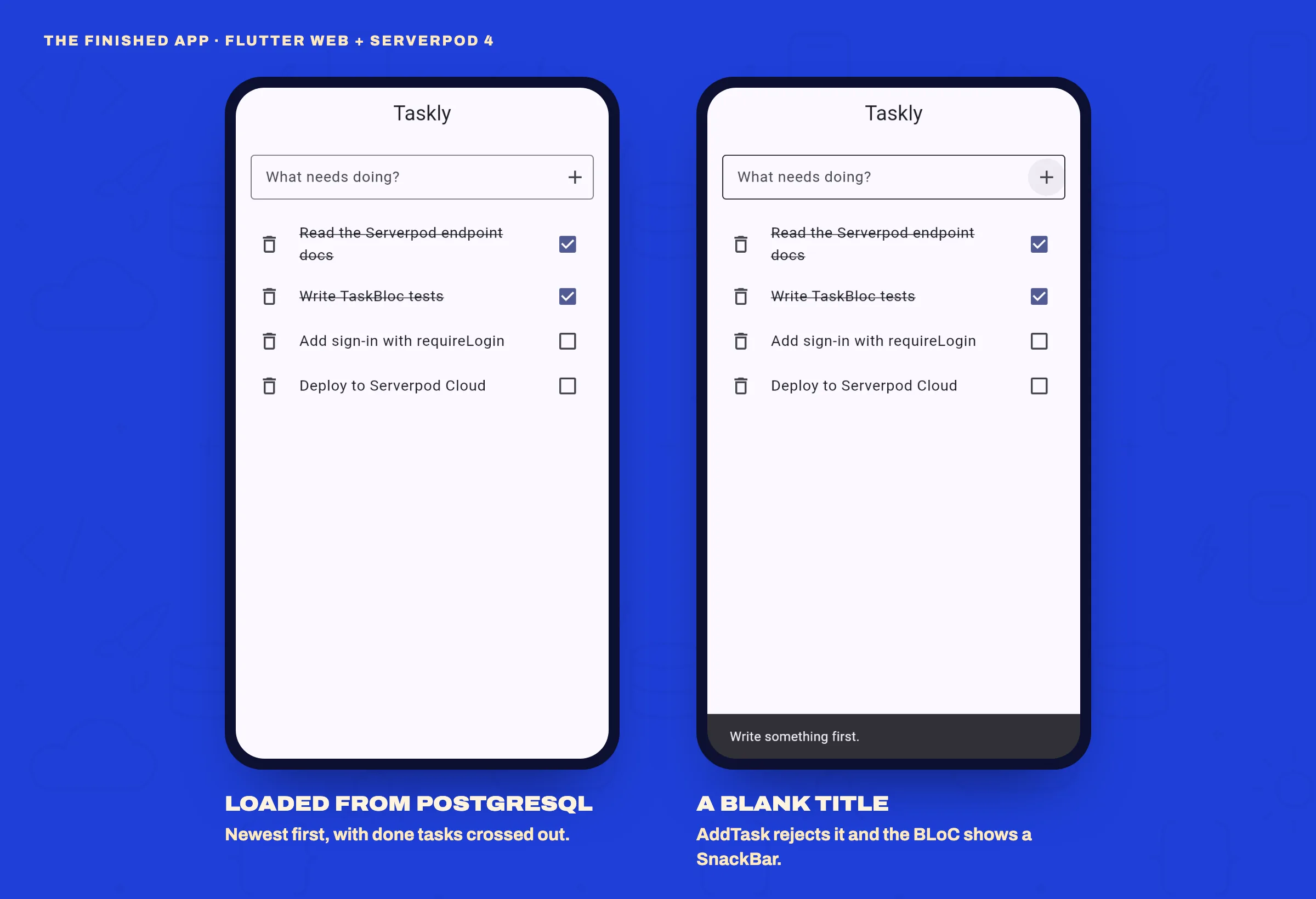
Hot reload doesn't re-run main(), so press R in the serverpod start terminal. Add a few tasks, tick one off, delete one, then restart again: the tasks are still there, loaded from PostgreSQL.
Step 10: Test the BLoC
Because the BLoC only knows the TaskRepository interface, you can test it with a mock and no server at all:
import 'package:bloc_test/bloc_test.dart';
import 'package:flutter_test/flutter_test.dart';
import 'package:mocktail/mocktail.dart';
import 'package:taskly_flutter/features/tasks/domain/task_entity.dart';
import 'package:taskly_flutter/features/tasks/domain/task_repository.dart';
import 'package:taskly_flutter/features/tasks/domain/task_use_cases.dart';
import 'package:taskly_flutter/features/tasks/presentation/bloc/task_bloc.dart';

class MockTaskRepository extends Mock implements TaskRepository {}

void main() {
  late MockTaskRepository repository;
  final task = TaskEntity(
    id: 1,
    title: 'Learn BLoC',
    isDone: false,
    createdAt: DateTime(2026, 10, 16),
  );

  setUp(() => repository = MockTaskRepository());

  TaskBloc buildBloc() => TaskBloc(
    getTasks: GetTasks(repository),
    addTask: AddTask(repository),
    toggleTask: ToggleTask(repository),
    deleteTask: DeleteTask(repository),
  );

  blocTest<TaskBloc, TaskState>(
    'loads tasks when the screen opens',
    setUp: () =>
        when(() => repository.getTasks()).thenAnswer((_) async => [task]),
    build: buildBloc,
    act: (bloc) => bloc.add(const TasksRequested()),
    expect: () => [
      const TaskState(status: TaskStatus.loading),
      TaskState(status: TaskStatus.success, tasks: [task]),
    ],
  );

  blocTest<TaskBloc, TaskState>(
    'rejects a blank title without calling the server',
    build: buildBloc,
    act: (bloc) => bloc.add(const TaskAdded('   ')),
    expect: () => const [
      TaskState(
        status: TaskStatus.failure,
        errorMessage: 'Write something first.',
      ),
    ],
    verify: (_) => verifyNever(() => repository.addTask(any())),
  );
}flutter testblocTest adds the events from act and checks that the BLoC emits exactly the states in expect, in order. The second test also proves the use case's rule works: a blank title never reaches the repository. Tests like these run in milliseconds, which is a big part of why the layers are worth it.
Run it on an Android emulator or a phone
serverpod start opens the app in your browser. To use an emulator or a real device, start only the server and run the app yourself:
# Terminal 1, in the project root
serverpod start --no-flutter

# Terminal 2
cd taskly_flutter
flutter run --dart-define=SERVER_URL=http://10.0.2.2:8080/
The Android emulator reaches your computer at 10.0.2.2. You need the SERVER_URL value because the scaffolded assets/config.json points at localhost, which on the emulator means the emulator itself. The iOS simulator shares your computer's network, so localhost works there. On a real phone, put your computer's local network IP in SERVER_URL instead, for example http://192.168.1.20:8080/ (find it with ifconfig on macOS and Linux or ipconfig on Windows), and keep the phone on the same Wi-Fi.
Common mistakes
- Editing generated code.
taskly_clientandtaskly_server/lib/src/generatedare rewritten every time code is generated. Change the.spy.yamlfile or the endpoint instead. - Changing a table model without a migration. After you add or change fields on a model with a
tablekey, press M. Until you do, the database and your code disagree. - Expecting hot reload to pick up API changes. When an endpoint's methods or a model's fields change, the generated client changes too. Press R.
- Renaming endpoint parameters after release. The app sends parameters by name, so renaming one breaks every app version already installed on people's phones. Treat a released endpoint like a public API.
- Forgetting about double taps. BLoC handles events concurrently by default. If a fast double tap mustn't send two requests, give that handler the
droppable()transformer from the bloc_concurrency package. - Importing
taskly_clientoutside the data layer. If a widget or the BLoC imports it, the layers start to leak.
You can check that last one from taskly_flutter. This command should print nothing:
grep -rl taskly_client lib/features/tasks/domain lib/features/tasks/presentationFAQ
Is Serverpod ready for production?
Serverpod is open source and on its fourth major version, with migrations, logging, health checks and test tools built in. You can host it yourself on any server that runs Dart, or use the managed Serverpod Cloud. As with any framework, check that the features you need, such as your sign-in providers and file storage, are covered before you commit.
Should I use Bloc or Cubit?
A Cubit exposes methods (cubit.addTask('...')) instead of events. It's less code and fine for simple screens. Use a Bloc when you want every user action recorded as an event, or need event transformers such as debounce or droppable(). The domain and data layers in this tutorial work unchanged with either.
Can I use Riverpod or Provider instead of BLoC?
Yes. Only the presentation layer changes: the use cases, repository and data source stay exactly as they are. That's the point of keeping the layers separate.
Where to go next
- Sign-in. Create the project with authentication, set
requireLogintotrueon the endpoint, and store the user's id on each task. - Pagination.
Task.db.findtakeslimitandoffset, so the endpoint can return tasks a page at a time. - Live updates. Streaming endpoints can push changes to every open copy of the app.
- Deployment.
serverpod cloud launchdeploys to Serverpod Cloud, or you can run the server on your own machine or VPS.
I build Flutter apps with Serverpod, Laravel and FastAPI backends for clients. If you're planning one and want help with the architecture or the build, have a look at my Flutter development service or get in touch.